Apps & Consumer
Spotify adds global controls to disable in-app video
Spotify is rolling out global controls allowing users to disable all in-app video, a move likely aimed at addressing regulatory scrutiny regarding video content's impact on younger users.
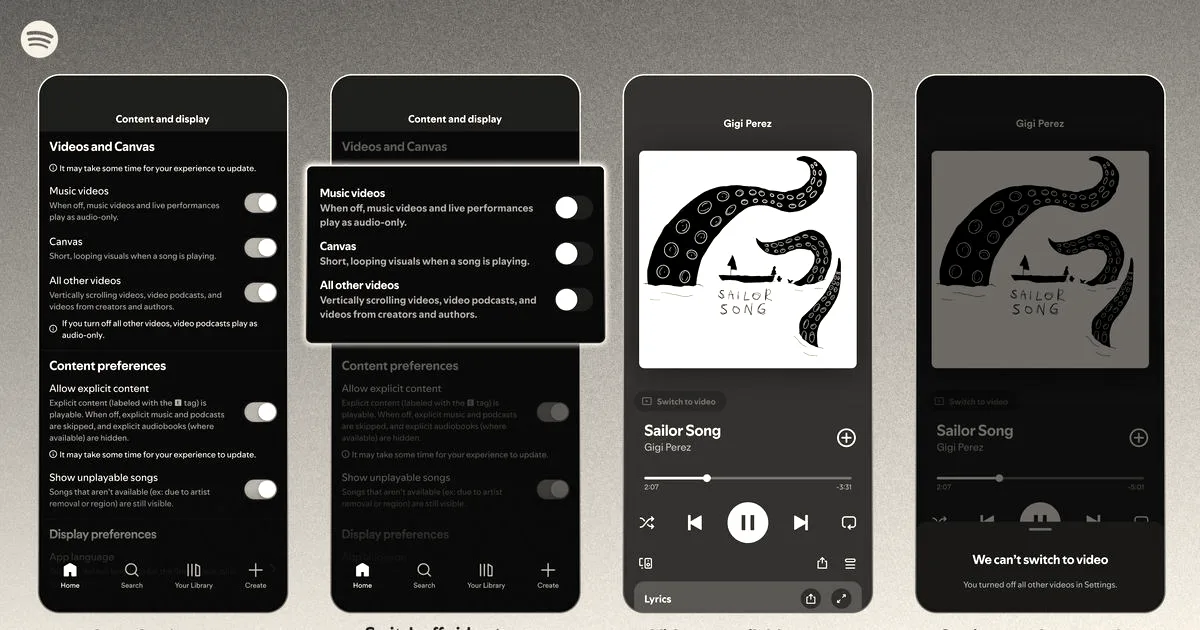
Spotify announced on Thursday that it is introducing new controls that allow users to disable all videos in the app. Starting today, Family Plan managers around the world can switch video content on or off for any plan member directly from their subscription settings. Previously, this feature was only available to managed accounts for users under 13. According to Spotify, 60% of those users under 13 had their video shut off by the account manager, such as a parent or guardian.
The setting update will begin rolling out to all users globally this month. This rollout will allow Premium and Basic users across Individual, Duo, Family, and Student plans, as well as users on Spotify’s free service, to control how video content appears in their app. By selecting these preferences, users can choose an audio-first experience on the app or a video-enhanced one, according to the company.
To access the video controls, users need to navigate to their settings and select the “Content and display” option. From there, they can switch the app’s Canvas—which is Spotify’s looping visual feature—or videos for music or podcasts on or off. Once users have selected their preferences, they will be applied across mobile, desktop, web, and TV platforms. However, Spotify notes that users will still see video ads, as well as Canvas-like videos on some audio ads.
The update follows a multi-year expansion of video features on the platform, which Spotify has introduced alongside its competitor YouTube:
- 2018: Spotify launched Canvas, its looping visual feature.
- 2020: The platform rolled out video podcasts.
- 2024: Spotify added support for music videos.
In a blog post, the company wrote, “Listeners can now choose exactly how they want to engage with the videos that amplify music, podcasts, and audiobooks on Spotify,” noting that having control over these settings allows users to feel ownership over their time spent on the platform.
By giving users the option to turn off videos, the company is likely looking to appease regulators and lawmakers who have a close eye on social and video apps’ impacts on younger users. Those who just want their music app to focus on music will also benefit from the change.
Why it matters
Spotify’s move to prioritize user control over video consumption reflects a broader industry shift as platforms face increasing pressure from regulators regarding the safety and impact of video content on younger demographics.