Apps & Consumer
Apple embeds AI features across iOS 27 apps
Apple is embedding AI features directly into iOS 27 apps like Messages and Safari to solve real-world problems, moving beyond a Siri-only interface for its AI strategy.
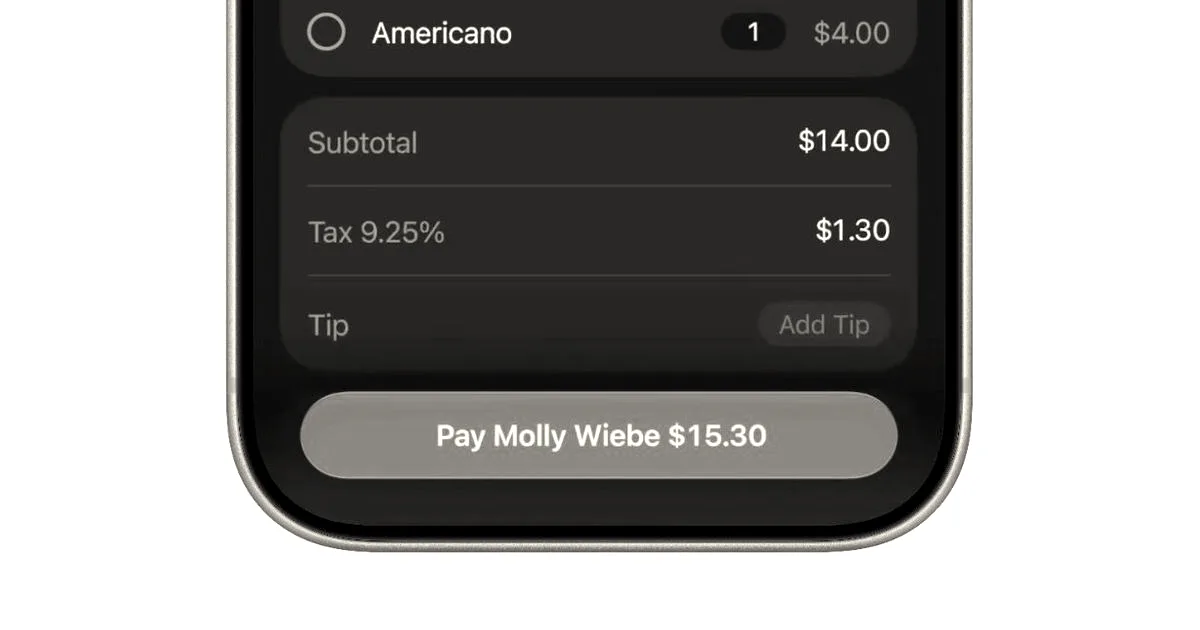
Apple is shifting its artificial intelligence strategy by embedding smaller, practical features across its software ecosystem in iOS 27, rather than relying solely on its Siri assistant. The company’s broader AI strategy focuses on weaving these capabilities directly into the applications users already interact with daily. These features are currently available in a developer beta and will arrive in a public beta soon, ahead of the general public release later this fall.
Among the new capabilities is a bill-splitting feature for Apple Cash, powered by Apple Intelligence (Apple’s AI platform). The tool extracts details from a photo of a receipt—including items, quantities, tips, and taxes—and integrates with Messages and Apple Cash. Users can select their specific items and request payments from a group chat, allowing others to select their own items or split costs by 1/2 or other fractions. Additionally, Apple is introducing a password-updating feature designed to secure accounts against a data breach caused by bad actors. Working alongside Apple’s Passwords app and third-party managers like 1Password, Dashlane, and Bitwarden, the tool uses AI to identify weak or compromised passwords and securely navigates websites to update them to more secure versions.
Other updates coming to the operating system include:
- One-tap suggestions in Messages: The app uses Apple’s AI platform to suggest actions based on conversation topics, such as adding reminders, sharing specific photos, or creating calendar events.
- Call context: This feature displays relevant information, such as airline confirmation codes pulled from emails, directly on the call screen during customer service calls.
- Natural language calendar entry: Users can add or modify events in the Calendar app by describing them in natural language, replicating features found in third-party apps like Fantasical.
- Automated Shortcuts: Users can configure workflows and everyday tasks, such as setting alarms based on calendar events or triggering actions when a DoorDash delivery arrives, by describing what they want their device to do.
- Organized tabs in Safari: The web browser uses AI to understand browsing activity and organize open tabs into relevant topic groups.
These features are designed to respect user privacy by processing data on-device and keeping browsing data secure from third parties, including Apple.
Why it matters
Apple is prioritizing practical, embedded AI tools within its existing ecosystem to solve specific user problems, rather than relying on a single AI interface.